
Rescuing a branch that branches from the wrong branch
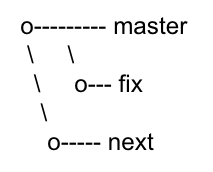
I am building a fix for the current release of a project, so the fix branch should branch out from the current master branch like this:
However, as I was working on the next release, in the next branch at that moment, I created the new branch from where I was working, with git checkout -b fix, so it became like this:
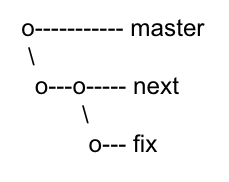
I should have used
git checkout -b fix masterinstead.
I had been pushing my changes in the fix branch regularly, and I only discovered the mistake when I wanted to merge my fix to master. After a few hours of catching up my git knowledge, I’ve got 2 solutions, one that will work for me in my scenario, and one that looks like it would work, however it can’t, unless I haven’t pushed my fix.
The working solution is
- Checkout a new branch from the
masterbranch - Cherry-pick the commits from the
fixbranch
The below diagram shows a more detailed description, with the ref of each commit and the files available in each commit, of the 3 branches. The files and ref are color-coded to show the branch which they originate from.
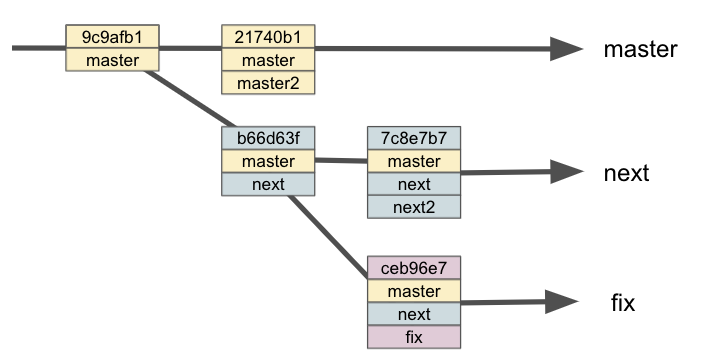
The first step is checkout a new branch from master with the command git checkout -b fixfix master. This will create a new branch named fixfix, that will only contain the files from the latest master branch, which contains 2 files.
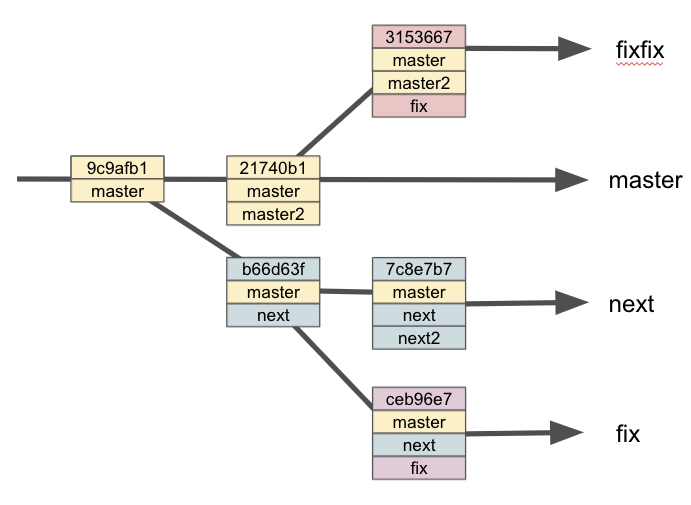
Then from the fixfix branch, we execute git cherry-pick ceb96e7 to add the commit in the fix branch to the current fixfix branch. The result is what we needed as in the diagram below.
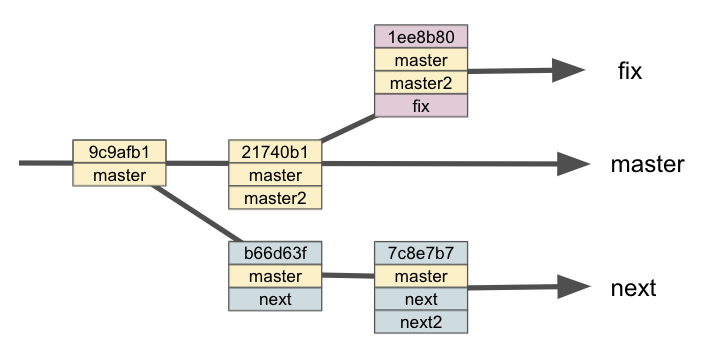
The other seemingly workable solution is to do git rebase. We can move the fix branch to branch out from the current master branch, instead of the next branch.
git checkout fixto make sure we are in thefixbranchgit rebase --onto master next fixto set the new starting point to themasterbranch. Having thenextspecified as the upstream, git will move the commits from after the upstream branch onwards.
The result will be as follows:
If we omitted the
--ontoparameter, and didgit rebase master fix, git will move all the files - (master, next, fix), instead of just (fix).
However, when we try to push the fix branch to the repository, we will get the following error message:
 ! [rejected]        fix -> fix (non-fast-forward)
error: failed to push some refs to 'https://github.com/thecodinganalyst/git-issue-demo.git'
hint: Updates were rejected because the tip of your current branch is behind
hint: its remote counterpart. Integrate the remote changes (e.g.
hint: 'git pull ...') before pushing again.
hint: See the 'Note about fast-forwards' in 'git push --help' for details.
This is because the fix branch was already in the remote repository, and this change does not have the same history as what is in the remote.
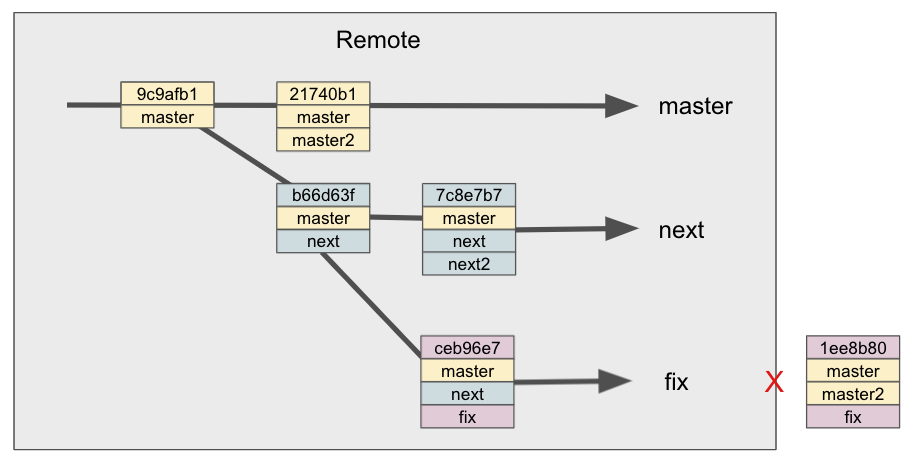
If we follow the hint in the error message to do a git pull, we will pull the next file to our branch, which is not what we want. So this solution will not work if we have already pushed our fix branch to the remote.